Harvest smarter.
Track everything.
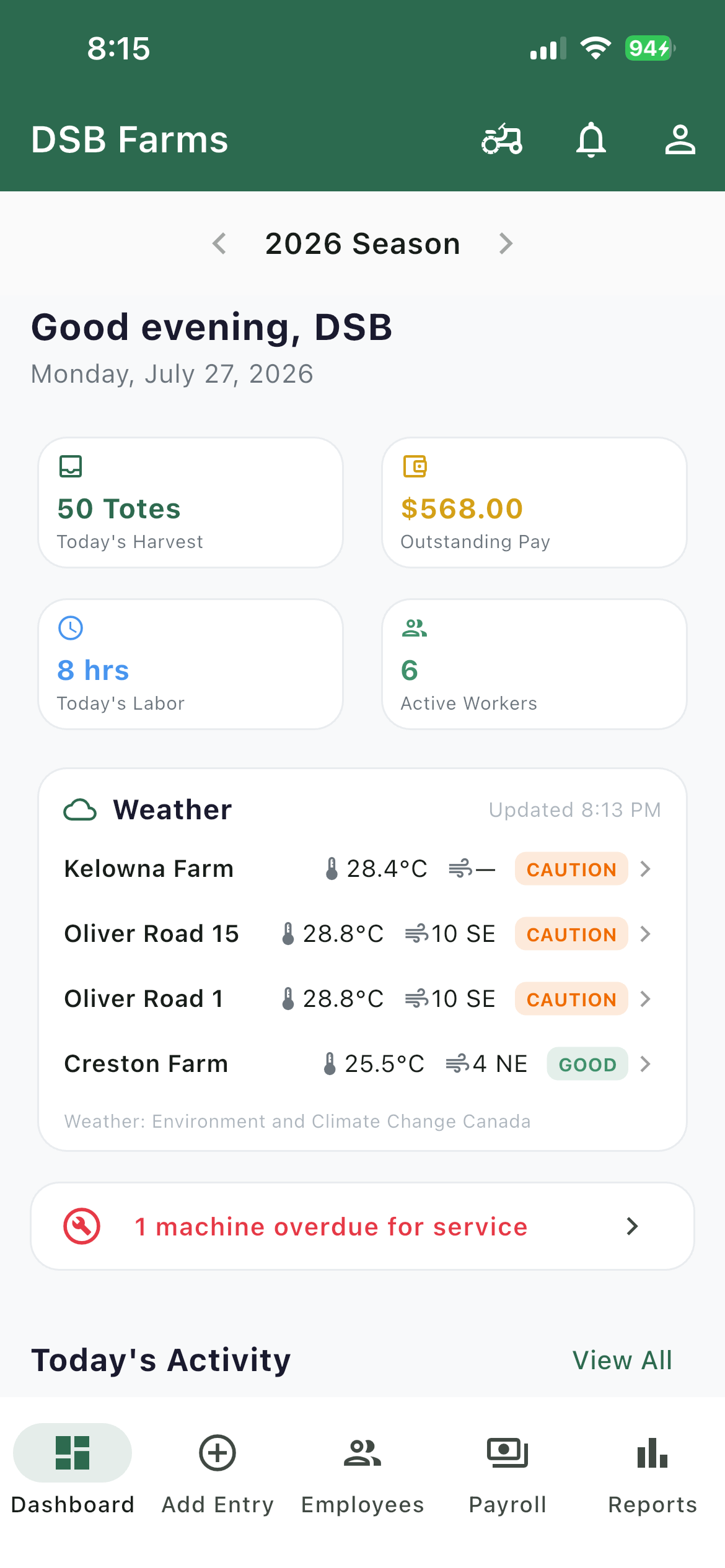
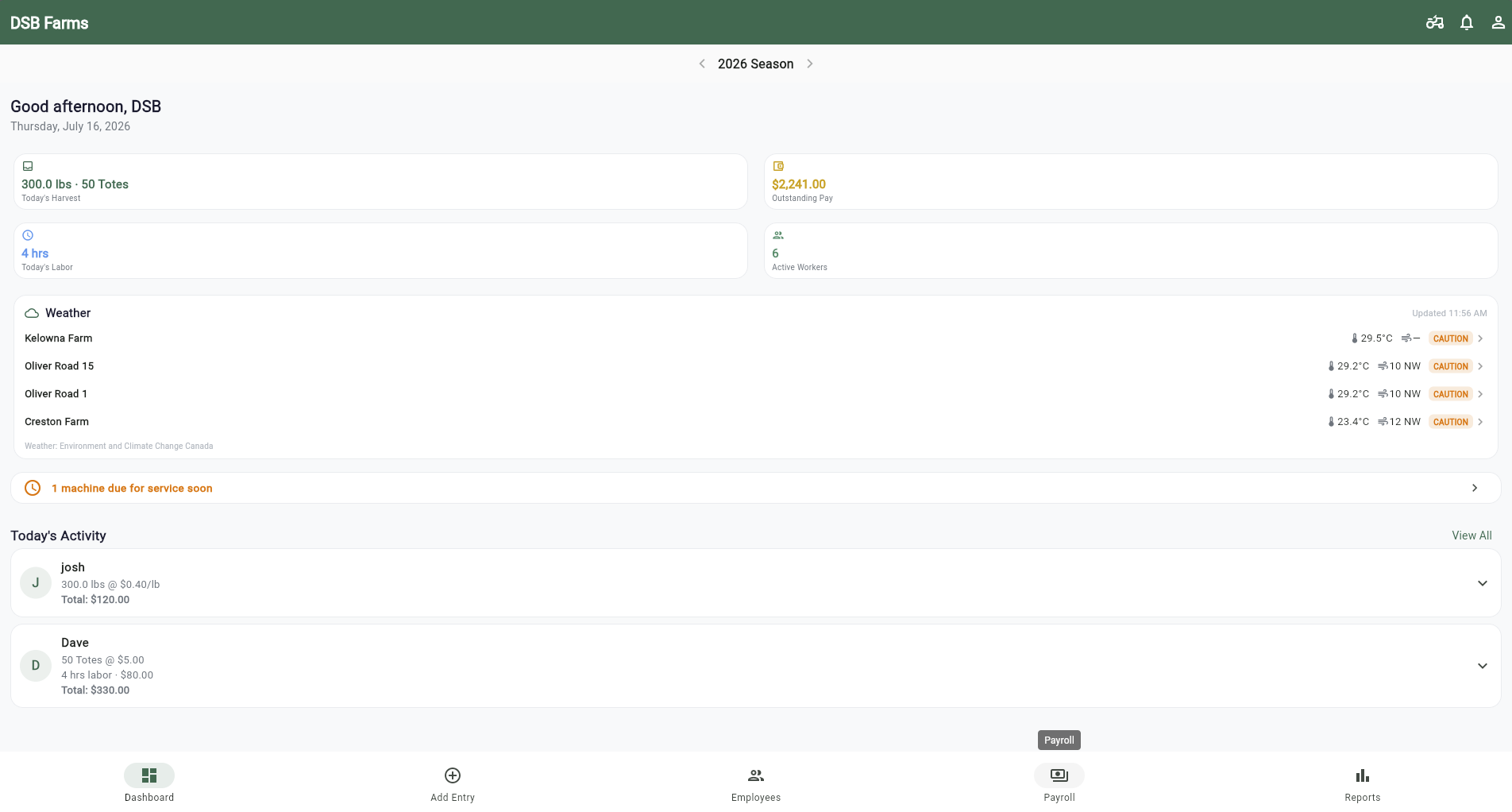
Log picks by tote, bin, or weight. Track labor and payroll, keep audit-ready spray records with live farm weather, stay on top of equipment maintenance, and reach your whole crew in one message. Real-time reports for fruit, grape, and vegetable growers everywhere.


500+
Harvest & labor entries logged
14
Features in one place — harvest to payroll
4
Crew languages: EN · FR · ES · PA
iOS + Android
On the App Store and Google Play — or any web browser
Same app on every screen
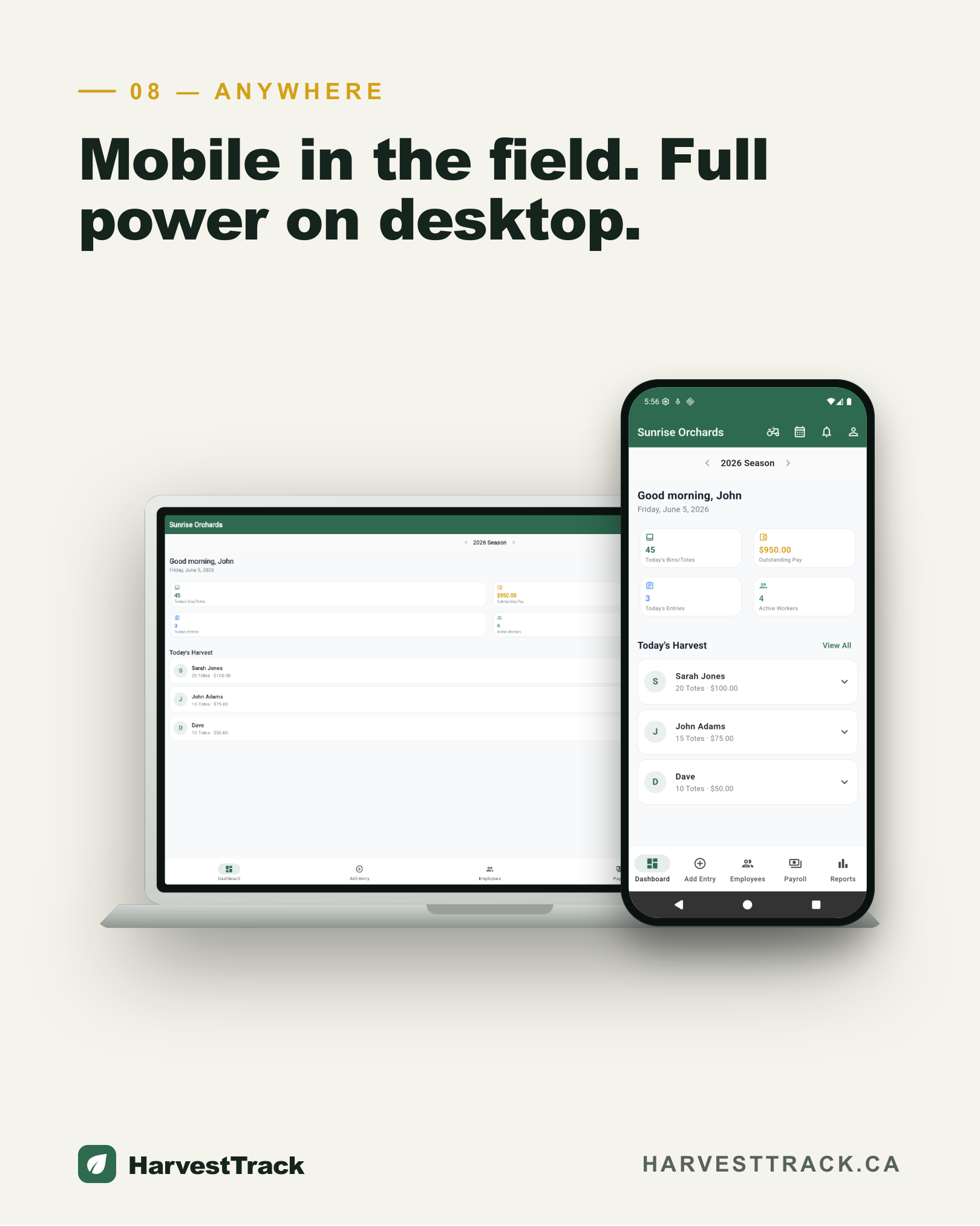
Open it in Chrome, Safari, or Edge — on your phone or your computer. Nothing to install. Or get the app on the App Store and Google Play.
Sound familiar?
Growers everywhere are still managing harvest records the hard way.
Spreadsheets break at harvest time
Manual tracking with Excel or paper means errors, lost data, and hours of reconciliation after a long day in the field.
Records get lost
Harvest logs buried in folders, phones, or notebooks make it impossible to pull what you need for payroll, audits, or end-of-season accounting.
No visibility across your team
Without a shared system, managers can't see what crews logged in real time, and mistakes only surface too late.
Spray records get filled in from memory
REI and PHI worked out by hand on a clipboard, and the exact temperature and wind at spray time gets guessed afterward — or skipped entirely.
Checking the weather means switching apps
Pull up a separate weather site, try to remember what it was like when you sprayed, then hope you wrote it down right. No link between the conditions and the record.
Servicing runs on memory and sticky notes
Oil changes, sprayer calibration, annual inspections — tracked in someone's head or a note on the shop wall. A machine goes down mid-harvest because a service quietly slipped past due.
There's a better way. Meet HarvestTrack.
Everything you need at harvest time
Built for the realities of the farm — fast, reliable, and simple enough for any crew member to use.
Harvest Logging
Log volumes, varieties, blocks, and crew in real time from any device. Record marketable yield and cull separately on every pick — no catch-up at the end of the day.
Time Entries
Log hours alongside harvest entries. Set a default hourly rate and adjust per entry for overtime, roles, or special tasks.
Cull Tracking
Record cull alongside every entry. See totals by block, employee, or date range to spot quality issues fast.
Team Broadcasts
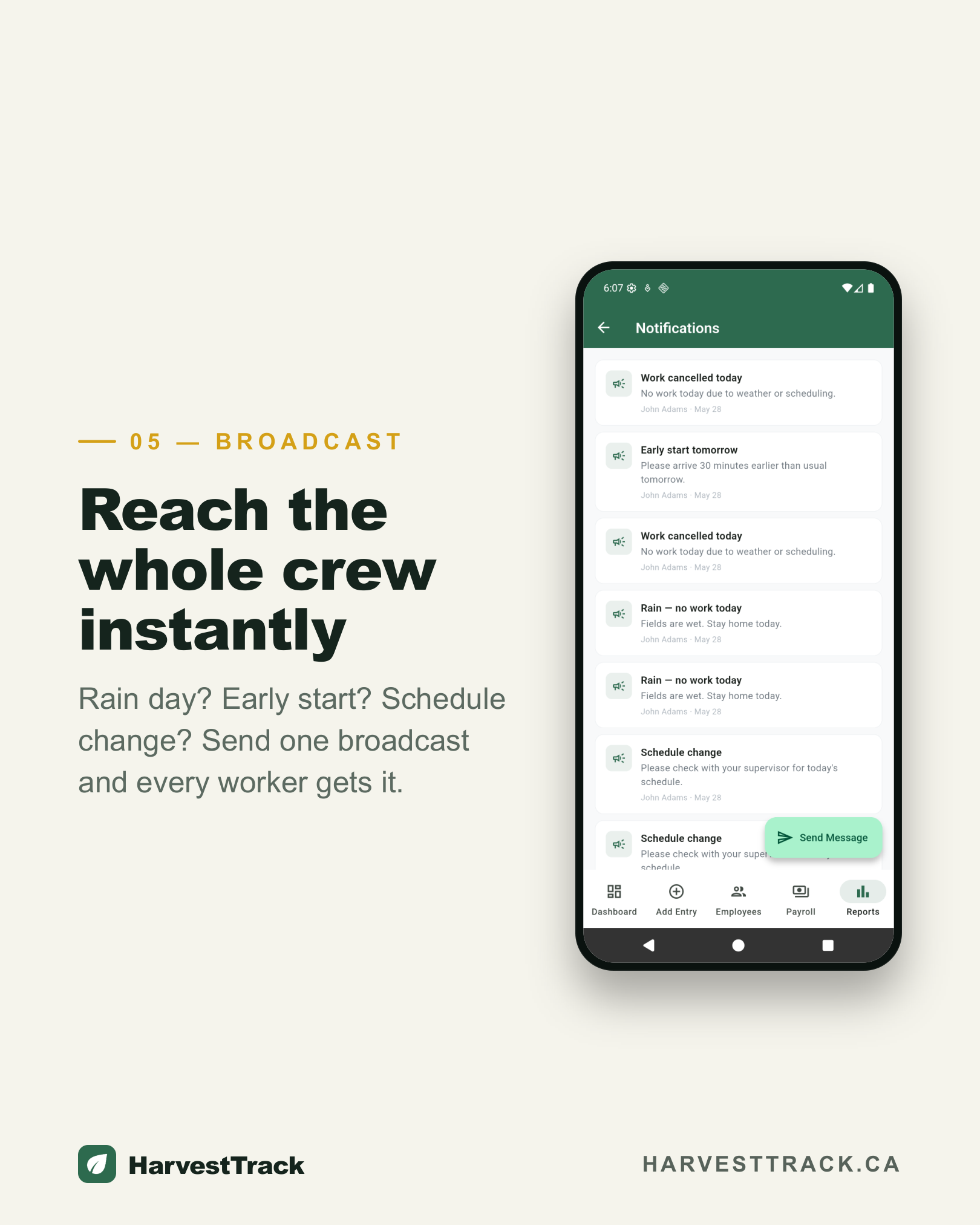
Send instant messages to your whole crew — rain days, cancellations, schedule changes. Everyone gets a push notification.
Payroll Tracking
Set pay rates per unit, block, variety, or hour. Get automatic per-worker payroll summaries with paid/unpaid status, ready to export to CSV.
Detailed Reports
Production summaries, worker breakdowns, and farm/block totals for any date range or season. Export to CSV.
Team Management
Add workers by email invite or join code. Assign manager roles and control who can log, view, or change records.
Employee Portal
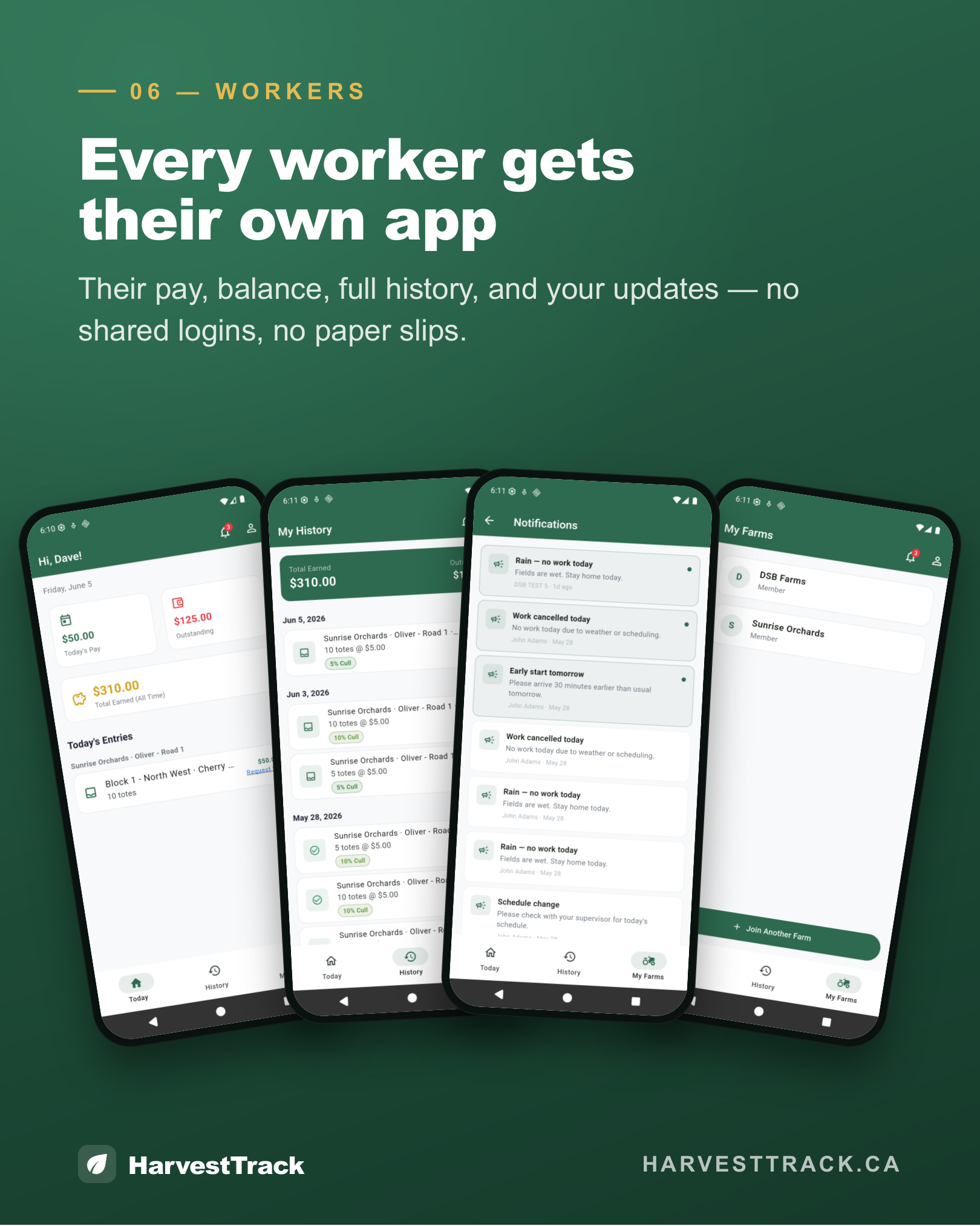
Each worker sees their own entries, daily earnings, and balance — across every farm they work, with one login.
Multiple Farm Management
Run more than one operation from a single account. Each farm keeps its own blocks, settings, and reports — while crew members are shared across all of them, with no duplicate accounts or re-inviting.
Season Management
Organize records by season and switch between years. Close a past season to lock it read-only.
Corrections & Audit Trail
Workers can flag an entry; managers approve or reject. Every action is logged — who did what, and when.
Multi-Language Support
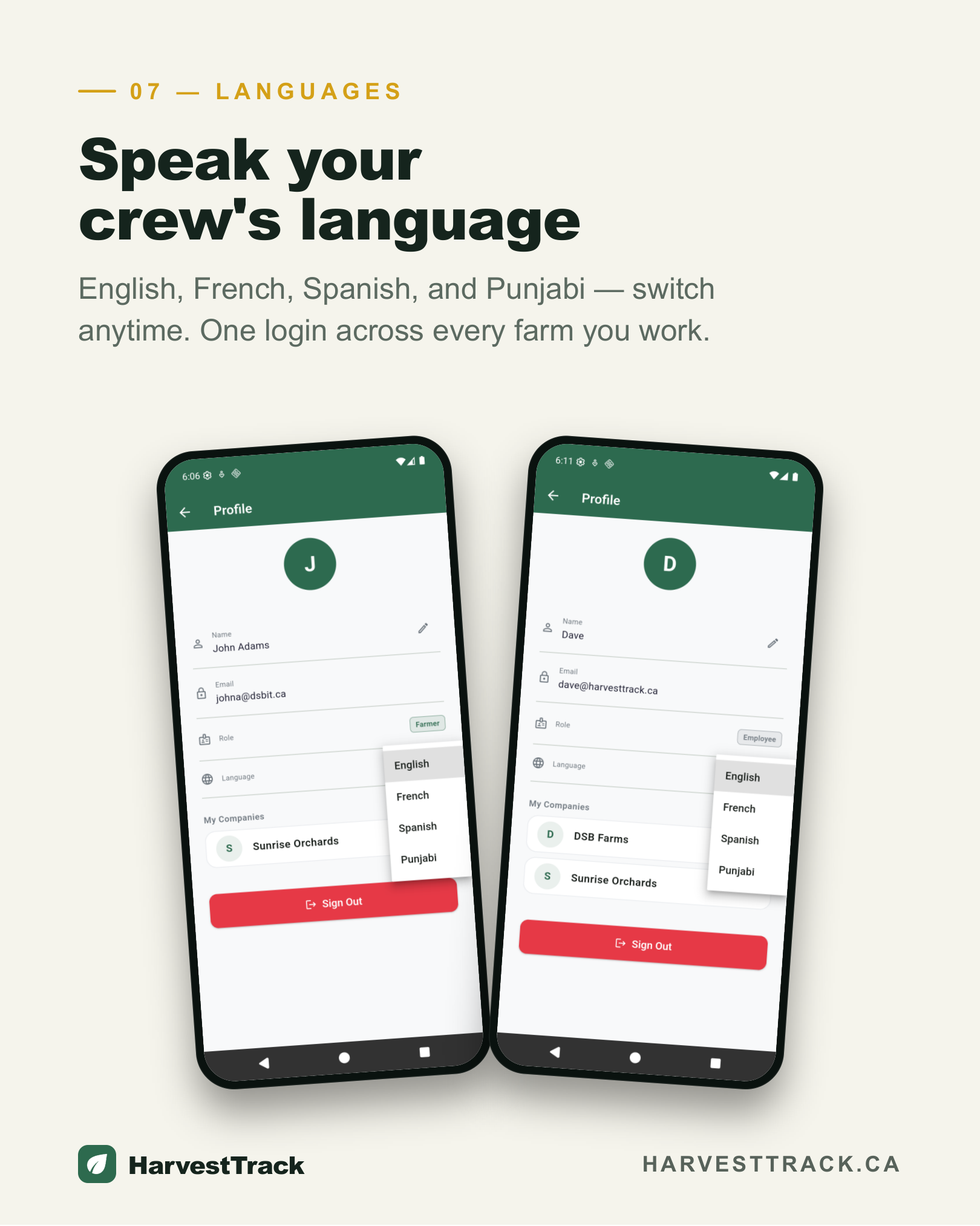
Available in English, French, Spanish, and Punjabi — so every crew member works in the language they're most comfortable with.
Farm Weather & Spray Windows
Live temperature and wind for every farm from the nearest Environment Canada station — with Good/Caution/Poor spray guidance and a 7-day forecast.
Equipment & Maintenance
Track tractors, sprayers and pumps. Service schedules by date and engine hours, breakdown logs, and audit-ready maintenance history — with a reminder pushed to your phone when something's due.
Every spray application — logged, calculated, and audit-ready.
Canadian regulations and food-safety programs require growers to document every pesticide application. Whether you're CanadaGAP certified, preparing for a buyer audit, or simply protecting your crew, HarvestTrack captures everything you need — automatically, with temperature and wind pulled from the nearest weather station, not from memory.
Safety Dates, Done For You
Enter your REI and PHI once per product. HarvestTrack automatically calculates when workers can safely re-enter a treated field and when the earliest safe harvest date is — shown live while you type, so nothing slips through.
Product Library
Save the products you use most — registration number, active ingredient, REI and PHI included. Pick the product on your next spray record and the fields fill themselves. Less typing, fewer mistakes, consistent records season after season.
Export for Any Audit
Every record exports to a clean CSV by season — covering application date, farm, blocks treated, applicator, environmental conditions, and calculated safety dates. Hand it to an auditor, a certifier, or a buyer with one click.
Weather, captured automatically.
One tap pulls temperature, wind speed and direction from the nearest Environment and Climate Change Canada weather station — and stamps the station name and observation time right on the record. Auditors see exactly where your numbers came from.
- Temperature & wind auto-filled on every spray record
- Station & observation time stamped for audit credibility
- Good / Caution / Poor spray-conditions guidance at a glance
- Hourly & 7-day forecast for every farm, right on the dashboard
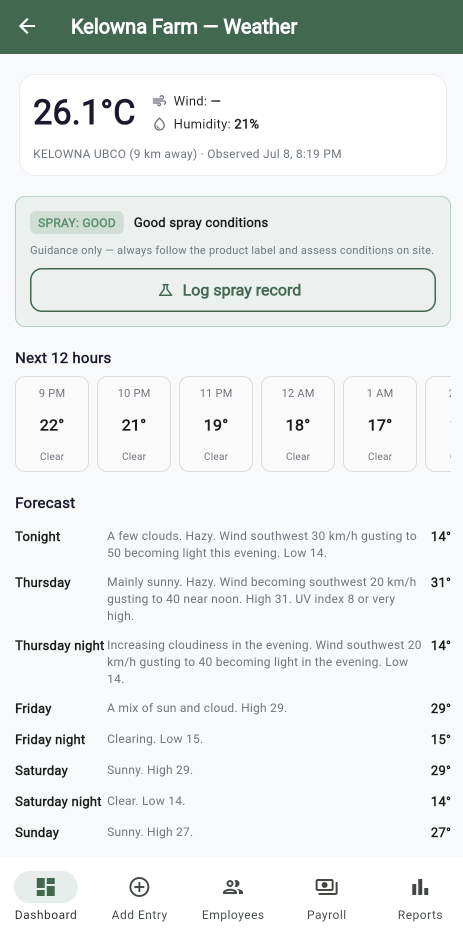
Weather data: Environment and Climate Change Canada
Designed to support compliance with:
CanadaGAP · GLOBALG.A.P. · BC Form 8A · WorkSafeBC REI requirements · PMRA registration tracking
Required for any operation using pesticides with hired workers or food-safety certification.
Keep every machine serviced, logged, and audit-ready.
Tractors, sprayers, pumps and trailers — tracked in one place. Service schedules that don't run on memory, a running list of what's broken, and a maintenance history you can hand straight to an auditor.
Never Miss a Service
Set schedules by calendar date and engine hours — whichever comes first. Overdue and due-soon flags on every machine, plus a daily check that pushes a reminder to your phone, even in the off-season when a service quietly slips.
Issues & Downtime, Tracked
Log a breakdown or known problem the moment it happens. It stays open until it's fixed — with resolution notes — so nothing gets forgotten between seasons or lost when a machine changes hands.
Service History for Any Audit
A full maintenance record per machine, including sprayer calibration for CanadaGAP. Export inventory, service history, and the issue log to a clean CSV in one tap — ready for a certifier or a buyer.
Reminders that reach you off-season.
The services you miss are the ones that come due when nobody's looking — an annual inspection in January, a hydraulic service between crops. HarvestTrack checks every machine daily and sends the reminder to your phone, so a missed service never turns into a breakdown mid-harvest.
- Schedules by calendar date and engine hours — whichever comes first
- Overdue and due-soon flags on every machine at a glance
- A daily check that pushes a reminder straight to your phone
- Lifetime and per-year service costs, so you know what each machine really costs
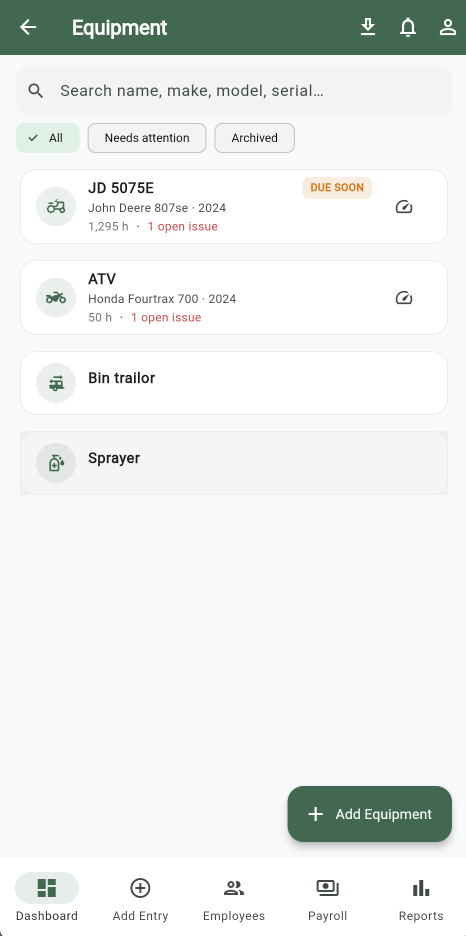
Overdue, due-soon and up-to-date — at a glance.
Sprayer calibration, built in.
One of CanadaGAP's required maintenance records — captured here as just another service type, and it lands in the same audit export.
From sign-up to first payroll in one season
Simple enough for a crew member on day one, powerful enough for a farm manager running multiple operations.
- 01
Set up your farm in minutes
Farm ManagerCreate your farm, add your blocks and fields, set varieties and pay rates, then invite your crew by email or share a join code. No demo call, no onboarding session — you'll be logging your first pick within the hour.
- Configure blocks with unit type (tote, bin, or weight)
- Set pay rates per unit, block, variety, or hour
- Invite crew by email or shareable join code
- 02
Log harvest by tote, bin, or weight
Farm ManagerEach block is already configured with its unit type — just select the block and the unit is set. Record the variety, marketable yield, and cull separately on every pick, in real time, from any phone or desktop browser.
- Unit type set per block — no guessing at entry time
- Marketable yield and cull tracked separately
- Works on any device, any browser — nothing to install
- 03
Track time and hourly labor
Farm ManagerLog time entries alongside harvest entries in the same place. Set a default hourly rate for your operation and adjust per entry for overtime, different roles, or special tasks — full flexibility without separate systems.
- Default hourly rate with per-entry overrides
- Track labor hours alongside piece-rate harvest entries
- All in one place — no separate timekeeping app needed
- 04
Crew see their data instantly
Crew MembersEvery worker has their own portal showing their picks, time entries, daily earnings, and outstanding balance — across every farm they work, with a single login. The moment you log an entry, they can see it.
- Visible the moment it's logged — no waiting until payday
- Works across multiple farms with one account
- Available in English, French, Spanish, and Punjabi
- 05
Run reports and pay your crew
Farm ManagerFilter by worker, block, date range, or season. See production totals, payroll summaries, and cull breakdowns at a glance. Export to CSV for your records or your accountant. Every action is logged — full audit trail.
- Production, payroll, and cull by worker, block, or date
- Export payroll summaries and harvest logs to CSV
- Full audit trail — every change logged with who and when
Every step of harvest, handled
Swipe through the app — from logging a pick to paying your crew.
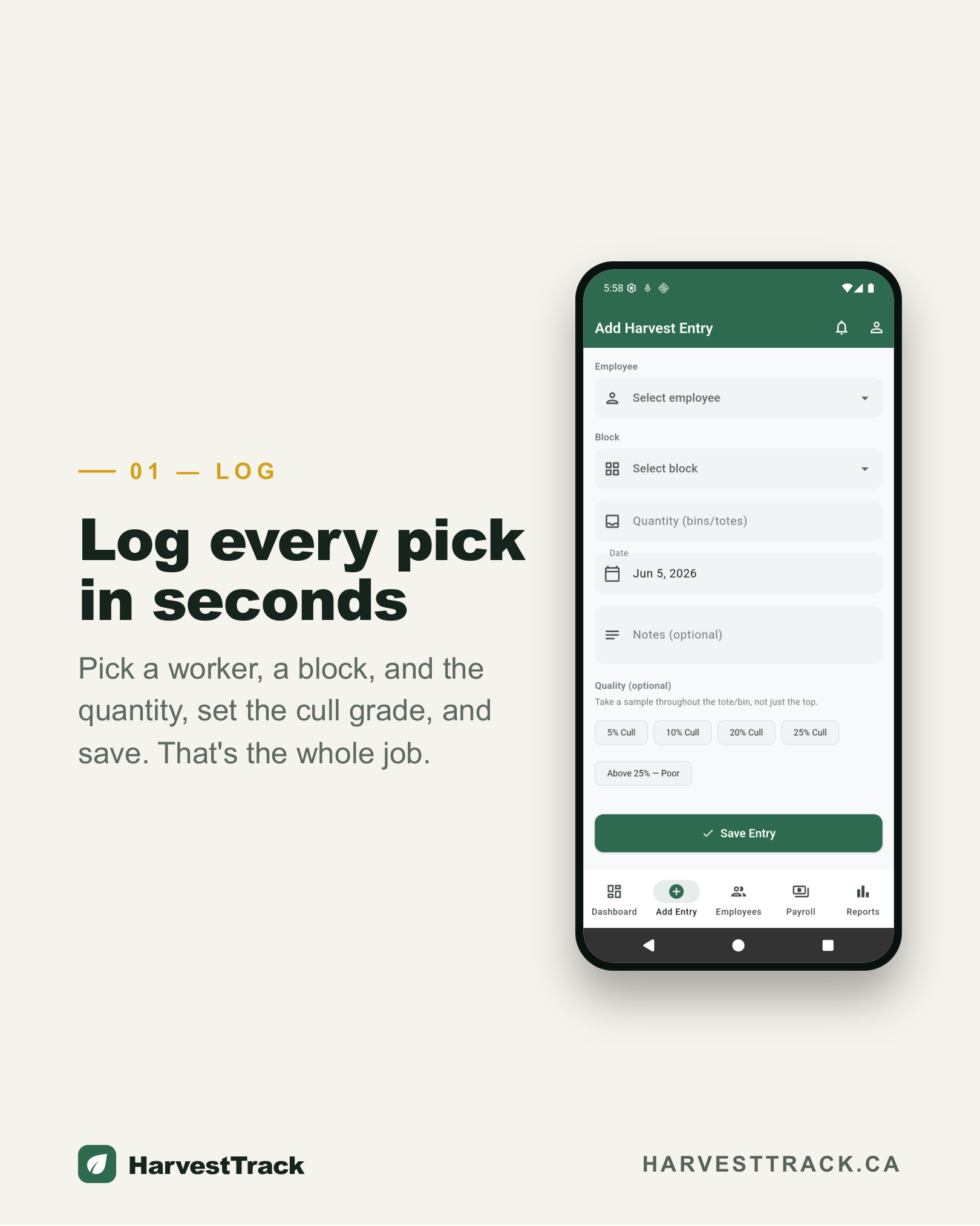
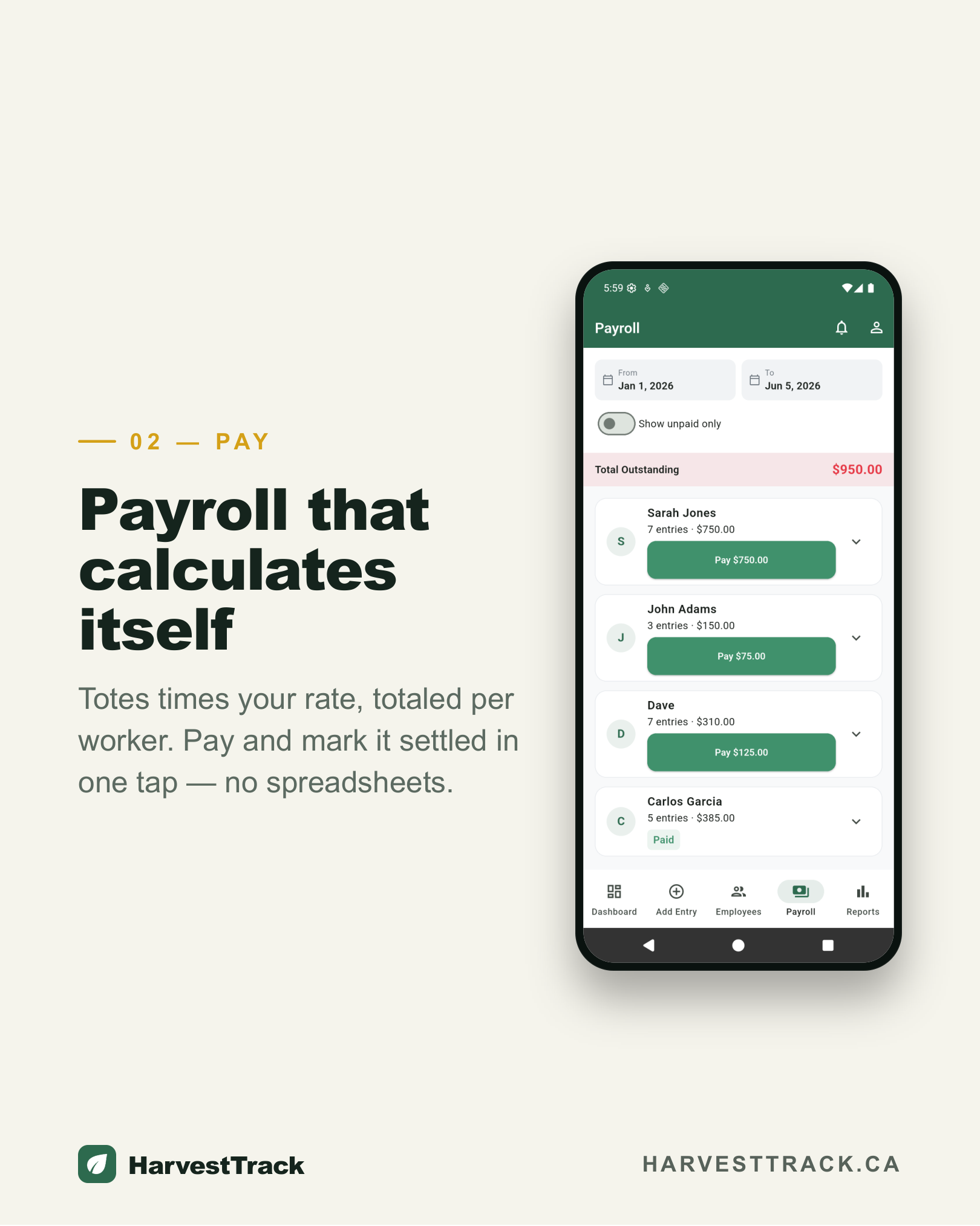
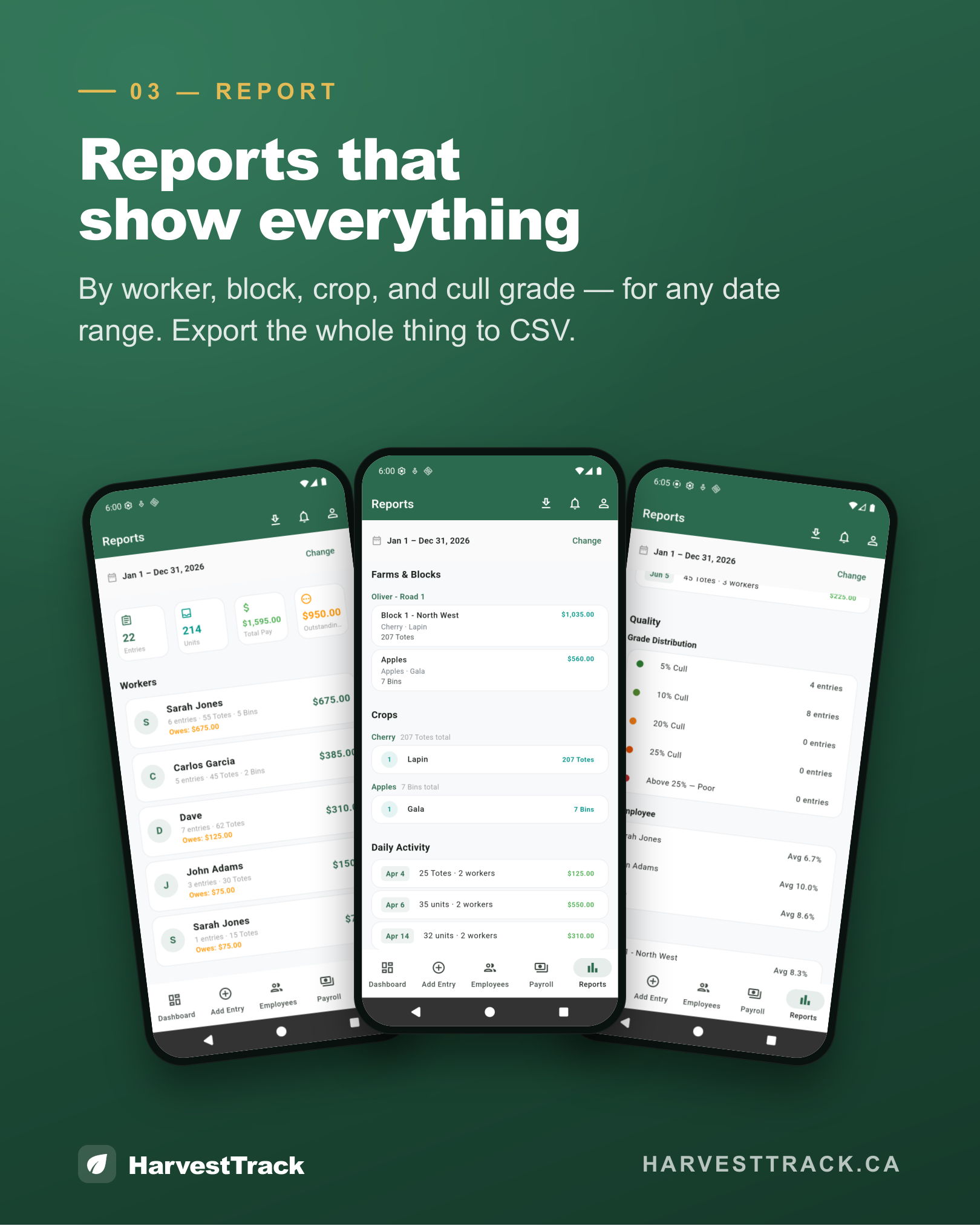
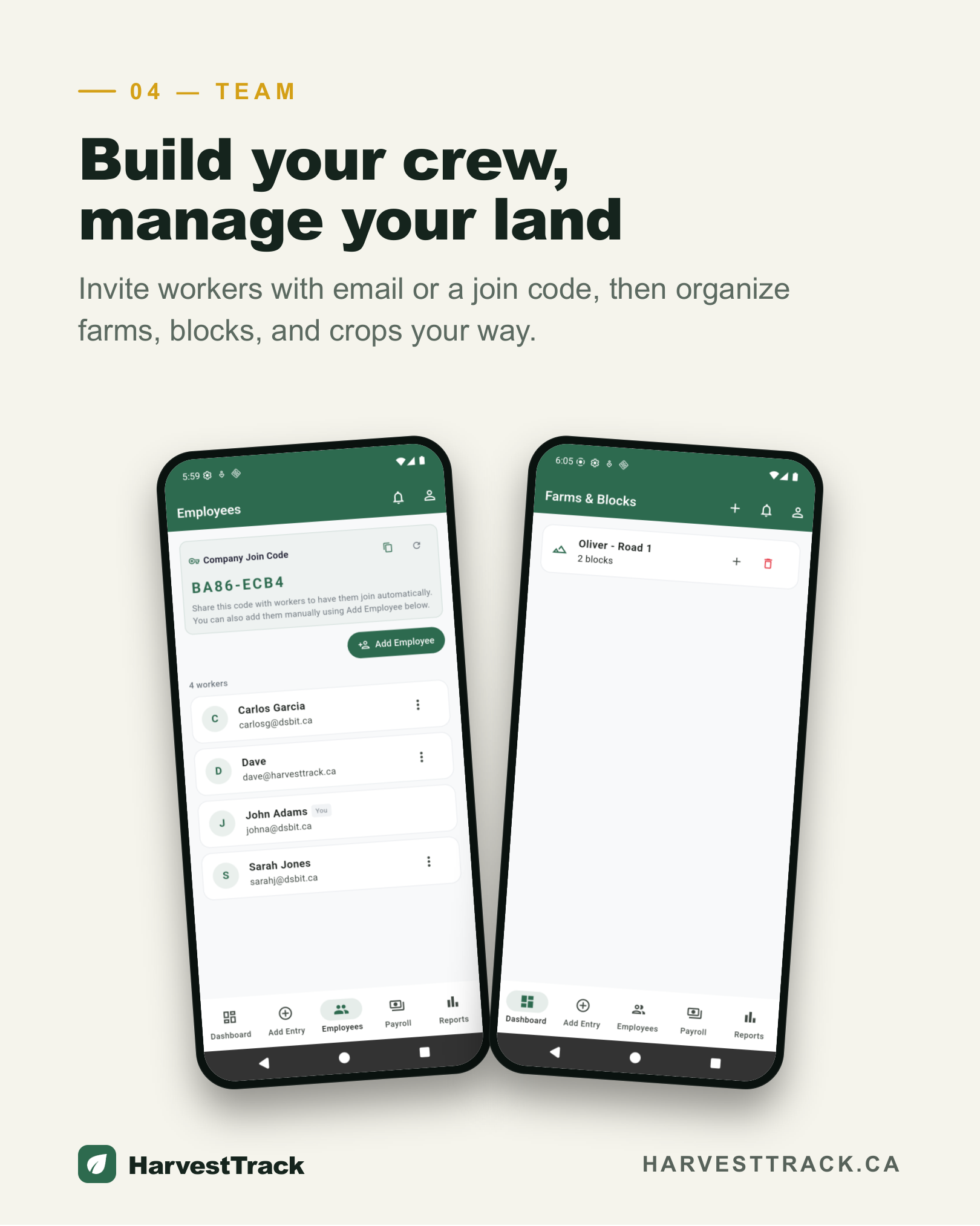
Swipe to explore
Born in the Okanagan.
Built for the world.
Dilpreet Brar and his family grow fruit and grapes in BC's Okanagan Valley. Like most growers, they managed harvest the old way — pen and paper, Excel spreadsheets, and too many late nights doing math that should have done itself. The tools they needed didn't exist, so they built HarvestTrack.
HarvestTrack logs every pick in real time — variety, block, yield, and cull — calculates payroll automatically, and generates reports that export to CSV. Workers get their own secure portal to track their earnings without shared logins. Manage multiple farms from one account, invite your crew by email or join code, send instant notifications, and keep full records across seasons with a complete audit trail. Available in English, French, Spanish, and Punjabi — accessible on any browser, phone or desktop.
The problems we solved in the Okanagan turned out to be universal. HarvestTrack is now used by fruit, grape, and vegetable growers wherever the harvest comes in — and we're just getting started.
Built for your crop
From apples to zucchini, HarvestTrack adapts to what you grow.
Tree Fruit
Apples, cherries, peaches, pears, and plums. Log picks by block and variety — marketable yield and cull tracked separately on every entry, in real time.
Apple · Cherry · Peach · Pear · Plum · Nectarine
Grapes & Vineyards
Track harvest by block or variety. Built for the pace and precision that wine and table grape operations demand, from flowering to final bin.
Wine Grapes · Table Grapes · Riesling · Pinot Noir · Cabernet
Vegetables & Berries
From field vegetables to soft fruit, log volumes, crews, and pay rates across your full operation — by weight, tote, or bin.
Blueberry · Strawberry · Asparagus · Lettuce · Tomato · Pepper
Share your feedback
Using HarvestTrack? We'd love to hear what's working and what isn't.
Thanks for your feedback!
We read every submission and use it to improve HarvestTrack.
Frequently asked questions
Everything you need to know about HarvestTrack.
What is HarvestTrack?
Who is HarvestTrack designed for?
Is HarvestTrack free during the beta?
What crops does HarvestTrack support?
How does team management work?
Does HarvestTrack track worker pay?
Can I track worker hours and time entries?
Can workers see their own harvest entries and pay?
Does HarvestTrack track cull?
Does HarvestTrack keep spray and pesticide records?
Where does the weather data on spray records come from?
Does HarvestTrack track equipment and maintenance?
Can I send messages to my whole crew at once?
Does it work on a desktop computer or just on my phone?
What happens to my data from previous seasons?
Can I manage multiple farms from one account?
Is HarvestTrack available in other languages?
When will the full version of HarvestTrack launch?
How does HarvestTrack compare?
Whether you're coming from spreadsheets or another app, here's what's different.
vs. spreadsheets
| Feature | Spreadsheets | HarvestTrack |
|---|---|---|
| Real-time harvest logging | Manual entry after the fact | Instant from any phone or browser |
| Payroll calculation | Manual formulas, error-prone | Automatic — per unit, block, or hour |
| Tote, bin & weight tracking | Complex custom setup | Built in per block — no setup per entry |
| Time entries | Separate spreadsheet or app | Logged alongside harvest in one place |
| Worker access to their data | Shared logins or email copies | Each worker has their own secure portal |
| Reports & CSV export | Build your own formulas | Instant — filter by worker, block, date |
| Cull tracking | Separate column, easy to miss | Separate field on every entry |
| Weather on spray records | Look it up and type it in — if you remember | Auto-filled from the nearest weather station |
| Multi-language support | One language only | English, French, Spanish & Punjabi |
| Audit trail | No history — edits overwrite | Every change logged with who and when |
| Works on phone & desktop | Desktop only, file sharing needed | Any browser — no install required |
vs. other harvest apps
| Feature | Other harvest apps | HarvestTrack |
|---|---|---|
| Get started | Demo or sales call required | Sign up and log your first pick today |
| Unit type per block | Fixed units or manual selection each entry | Configured per block — auto-fills on entry |
| Time entries | Separate module or not available | Logged alongside harvest in one place |
| Worker portal | Shared logins or view-only access | Individual secure login per worker |
| Language support | English only | English, French, Spanish & Punjabi |
| Multiple farm management | Separate accounts per farm | All farms under one account, crew shared |
| Built-in farm weather & forecast | Rare, or a paid add-on | Included — Environment Canada data, free |
| Works on any browser | Native app install required | Any browser — phone or desktop, nothing to install |
| Pricing | Per-seat or per-farm fees | Free during beta |
| Where it's built | Typically US-based | Built in BC's Okanagan Valley, Canada |
Spend harvest in the field,
not in spreadsheets.
Set up your farm in under five minutes. Free during beta — no credit card, nothing to install.
Works in any web browser, on your phone or your computer.